

Building a profile that stands out
Your profile is how funders meet your charity. When a fund holder, advisor or foundation looks you up, it's often the first and only thing they read before deciding whether to learn more. We've already started it from your CRA data, and the rest is yours to tell.
Start with what matters most
These are the sections funders read first, in the order we'd tackle them:
Mission, vision and values. Who you are and why you exist.
What makes you unique. Your unique value proposition: what your charity does that others don't, or does differently.
Board and leadership. Who guides your work.
Audited financial statements. The most trusted picture of your financial health.
Your latest annual report. We read it and build your impact page from it.
That's the core of a strong profile, and most charities can finish it in one sitting. Projects are optional. Add one if you're raising money for something specific, but there's no need to start there.
There's no minimum score or required level of completeness to appear on WellFunded. A fuller profile simply gives funders a clearer picture and fewer reasons to move on. Start with the core and build from there as time allows.
Telling your story
Write your mission, vision, values and what makes you unique the way you'd explain your work to a donor over coffee. Plain language beats polished language. Funders review a lot of charities, so a few honest sentences on these help them read your work accurately:
Your stage of growth and scale
The environment you operate in, and any constraints
Recent changes or transitions
Your current priorities
Context isn't about justification. It's about clarity.
Board and leadership
Add each person's name, role and a short line on their background. It doesn't need to be long, just clear and accurate. Photos make your profile stand out, so they're worth adding.
Your directors also appear in your CRA filing. Keeping this list current heads off questions when a funder reviews your governance.
Financials and annual report
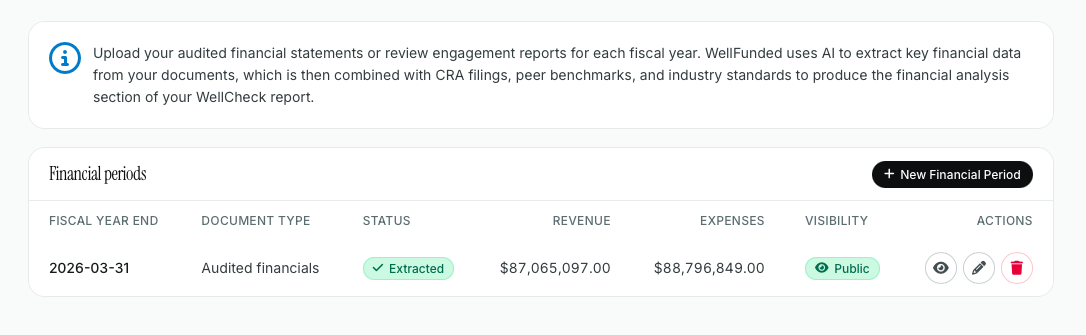
Audited financial statements or review engagement reports: Charity Portrait, then Financials, then New Financial Period.
Annual report, strategic plan, theory of change and project reports: Charity Portrait, then Uploaded Documents.
When you upload an annual report, select its year so your impact page shows the right numbers. We read the report, pull out your impact stats and stories, and turn them into a polished impact page for you. If a stat comes out wrong, you can flag it (see Keeping your information accurate).
Upload Location:
Click on New Financial Report on the top right.
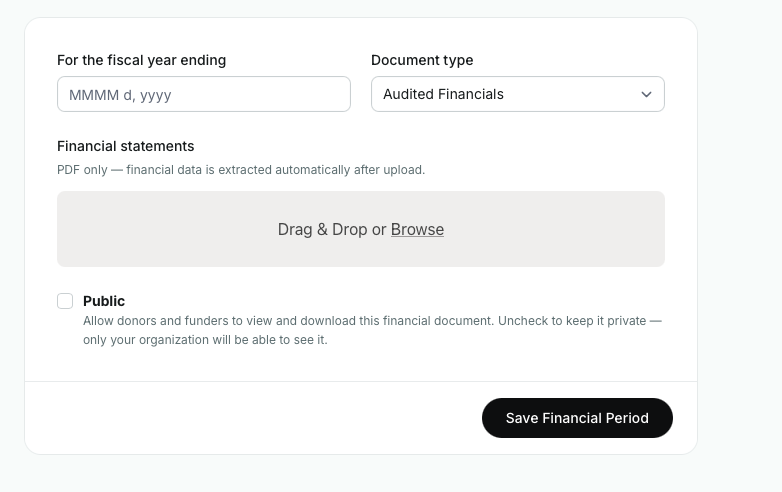
Selecting the relevant year for the financial report:
Input the relevant year, then click save when done.
Images and logo
Images help funders understand your work at a glance. Program photos, events and community moments all work well, and they don't need to be professionally produced. Keep each image to a reasonable size, ideally between 1 and 3 MB.
To add or replace your logo, click your user name in the top right, choose Organization Settings, and upload it in the Organization Logo field. For the best result, use a square PNG or JPG with a transparent or solid background, and avoid logos with small text.
Impact areas, locations and tags
These are how funders find you. If a donor wants to support homelessness on the Downtown Eastside, accurate tags are what put your charity in front of them.
Choose the areas that most closely match your work, not every one that could apply.
Avoid broad or unrelated tags.
Update your locations when your work expands or changes.
Accreditations
Add any accreditations, standards or memberships your charity holds from the list on your profile. They add context and help funders compare charities consistently. They're not a requirement to be on WellFunded.
Keeping it current
We don't want WellFunded to be more work for you. Set up your profile once, then check in every now and then, or when a WellFunded administrator reaches out. It's worth a quick visit when your programs or priorities change, when you publish a new annual report or when your board changes. Update once and it's current for every funder on WellFunded.
Still Need Support
If you have any questions or need additional assistance, please don't hesitate to contact our WellFunded Support team via email at support@wellfunded.io or by phone at 778-486-2030. We're always happy to help!