

Keeping your information accurate
The information on your WellFunded profile comes from three places: the CRA, your annual report and you. Knowing which one you're looking at tells you how it gets updated.
Financials, legal name, CRA director list and staff counts come from your T3010 filing with the CRA. They update automatically once the CRA publishes a change.
Impact page stats and stories come from your uploaded annual report. If one is wrong, flag it and we'll correct it.
Mission, vision, values, leadership, images and locations come from you. Edit them on your profile any time.
Information from the CRA
Your financial figures, legal name, CRA director list and staff counts come from the T3010, the annual return every registered charity files with the CRA. We sync regularly with the CRA's public data and show it exactly as filed. We don't edit it.
The CRA can take a long time to process and publish changes. Once it publishes an update and that data reaches us, it appears on WellFunded automatically.
If a figure looks wrong, start with your charity's listing on the CRA's charity search. In most cases, what's on WellFunded matches what's on file with the CRA. If the filing itself needs correcting, that's done with the CRA directly.
Changed your name? Your legal name comes from the CRA, so it updates once the CRA's records show the new name.
A board member has left? Update your board and leadership on your profile. Your CRA director list follows your next filing.
Impact page stats
When you upload your annual report, we read the text and turn it into the impact page funders see, presenting your stats and stories the way we think donors will best understand them. Our tool gets most of it right, but sometimes it misreads a figure. When that happens, flag it.
Open your impact page.
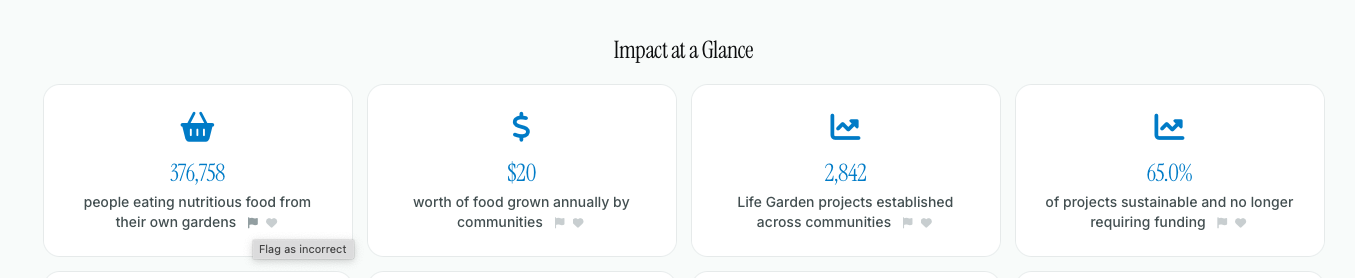
Hover over the stat that's wrong. A small flag icon appears.
Click the flag.
Explain what's wrong and what the correct figure is. Point to the page in your annual report if you can.
Submit. A WellFunded administrator reviews your note and makes the change.
The clearer the note, the quicker the fix. For example: "Our 2025 report shows 82% of spending going to programs (page 14), not 66%."
Watch how it works: Fixing a stat on your impact page.
Close up of Flag Icon, when impact stat is incorrect:
Two things worth checking first:
The report year is selected. If your impact page still shows last year's numbers after you upload a new report, check the year on the document.
The report is your own. If you're the Canadian arm of a larger network, upload your Canadian charity's annual report. A parent organization's report can lead to its outcomes being credited to you.
Everything you control
Your mission, vision, values, unique value proposition, leadership, images, impact areas and locations are yours to edit any time. Changes show as soon as you save. See Building a profile that stands out.
Your WellCheck
A WellCheck is a point-in-time report, so it's handled differently. See What a WellCheck is and why it matters.
Still Need Support
If you have any questions or need additional assistance, please don't hesitate to contact our WellFunded Support team via email at support@wellfunded.io or by phone at 778-486-2030. We're always happy to help!