

Completing your WellCheck
Completing a WellCheck takes most charities 15 to 20 minutes. You upload a few documents, answer about 15 short questions and submit. Our analysis does the rest.
Watch how it works: Completing your WellCheck.
Step 1: Upload your documents
Your documents carry the most weight, because our analysis reads them directly. More documents make for a fuller report, but you'll get a thorough one with whatever you have.
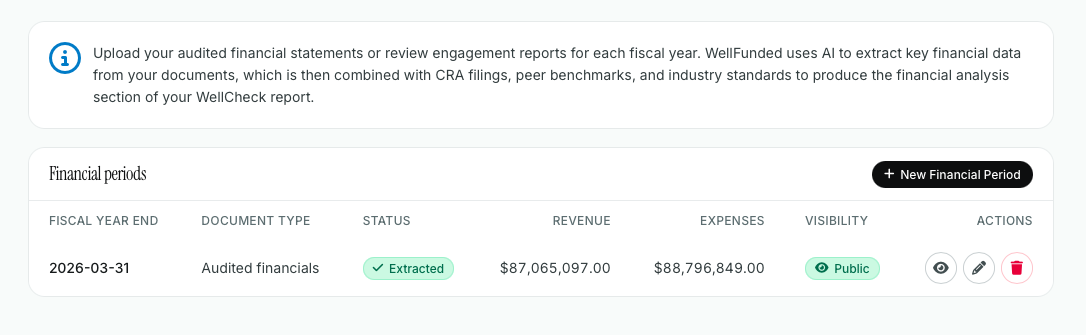
Audited financial statements or review engagement reports: Charity Portrait, then Financials, then New Financial Period.
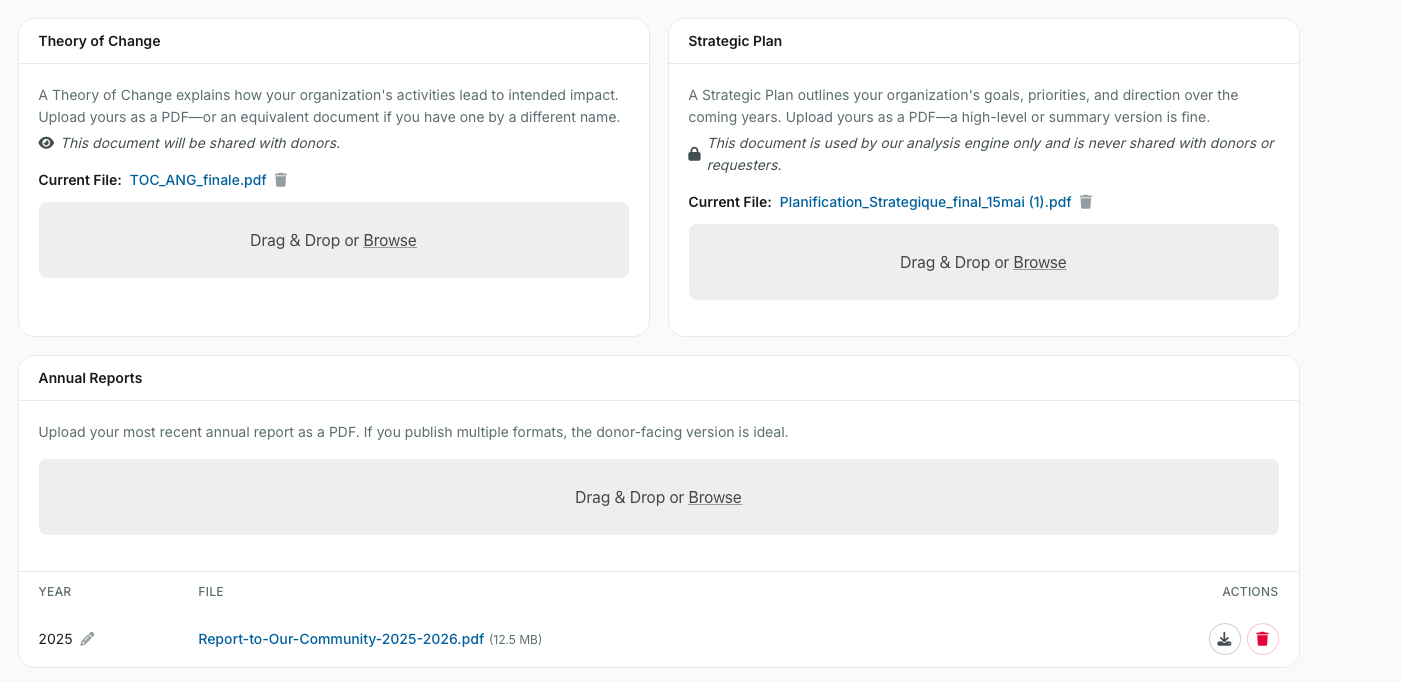
Annual report, strategic plan, theory of change and project reports: Charity Portrait, then Uploaded Documents. Drag and drop or browse.
Upload location of audited financial statements:
Go into the financials tab, click on "+ New Financial Period" on the top right
Upload location of strategic plan, theory of change, project reports:
Go into the uploaded documents tab, and add the relevant document to the Drag & Drop box.
A few tips:
Upload files, not links. If your annual report only exists as a web page, save it as a PDF from your browser (Ctrl or Cmd + P, then Save as PDF) and upload that.
Upload your own charity's documents. If you're part of a larger network, use your Canadian charity's reports, not the parent organization's.
Select the year on each annual report so your figures line up with the right period.
Step 2: Answer the questions
The questions cover four areas:
Leadership: How long your executive director or CEO has been in the role.
Governance: Board term limits, your longest-serving director, lived experience on the board, conflict of interest policy, CEO evaluation, staff on the board, your governance manual.
Finances and fundraising: Financial expertise you can draw on, number of donors, donor retention, and the share of funding from your top five donors.
Impact: How you verify impact, one change made because of feedback from the people you serve, and one goal from your strategic plan and how you're tracking it.
Answer in your own words. Clear and direct beats polished, and there's no need to worry about formatting. Your answers appear in the report's sources, marked as provided by your charity, so accuracy matters more than length.
Questions charities ask us about
"Can you give one example of a change you've implemented because of constituent feedback?" Pick one specific time feedback from the people you serve led to a real change in a program or service. One concrete example tells a funder more than a list.
"Share one specific goal from your current strategic plan and how you're measuring progress toward it." Choose a goal you're actively tracking, and name the measure you use.
"What percentage of your total funding comes from your top 5 donors?"
Include all funding sources, including individual donors, corporate donors, government funders, and foundation grants.
Identify your five largest funding sources and calculate their combined contributions as a percentage of your organization's total funding for the reporting period.
"How many years has the longest serving board member been serving?"
Enter the number of consecutive years your longest-serving current board member has served.
If a board member has served multiple terms with a break in between, count only their current uninterrupted period of service. Do not include years served before the break
You're part of a national or international network. Answer for your Canadian registered charity only, the one tied to your CRA number.
You don't have a theory of change or strategic plan. That's fine. Upload what you have, and answer the questions as fully as you can.
What we mean by a project report. A report on a specific program or project, like one you'd send a grantmaker at the end of a grant. It shows what you did and what came of it.
Step 3: Submit
Click Submit once your documents are uploaded and your questions are answered. A member of our team reviews the report before it's shared, and you'll receive the finished WellCheck along with the funder who requested it.
Updating an older WellCheck
If you completed a WellCheck before our latest version, you'll see a banner on your WellCheck page. Click Start Updated WellCheck. Your previous answers are already filled in, so you only need to upload any missing documents, review your answers and submit. Most charities finish in under 10 minutes. (can request update to well check if you made a mistake)
Still Need Support
If you have any questions or need additional assistance, please don't hesitate to contact our WellFunded Support team via email at support@wellfunded.io or by phone at 778-486-2030. We're always happy to help!